
How to Use Claude Code FREE in 2026-5 Real Methods, Full Setup, No GPU Required

Hey — if you’ve been trying to use Claude Code without paying Anthropic’s API fees, you’ve probably already been burned by tutorials that showed you something that either requires a $4,000 Mac, or promises “unlimited” and then hits you with a rate limit after 20 messages.
In this guide, I’m going to walk you through all five real methods that actually work in 2026 — honestly comparing what’s free, what’s fast, what’s good enough for actual coding, and what’s just hype. Let’s go.
Why Claude Code Is Expensive — And Why People Want Free
Claude Code is Anthropic’s terminal-based AI coding agent. It reads your whole codebase, writes files, runs shell commands, and autonomously completes multi-step programming tasks. It’s genuinely one of the best AI coding tools available.
But the cost is real. Claude Code runs on Anthropic’s API:
- Claude Sonnet: ~$3 per million input tokens, ~$15 per million output tokens
- Claude Opus: Significantly more expensive
- Claude Max plan ($100/month): Included usage, but limits are hit by power users in days
A moderately heavy coding session — feeding large files, running autonomous tasks, context-rich interactions — can easily cost $10–$30 in an afternoon. For students, hobbyists, and developers in lower-income regions, this pricing simply isn’t viable.
The key insight that makes free setups possible: Claude Code uses a standard HTTP API to talk to Anthropic’s servers. If you run a local server that emulates that same API, Claude Code can’t tell the difference. It will happily talk to any backend you put behind it — free cloud models, local models, or anything in between.
That’s the foundation every method in this guide builds on.
What Is Claude Code? (Quick Background)
Claude Code is a CLI (command-line interface) tool, not a browser extension or a chat window. You run it in your terminal. It operates as an autonomous agent with direct access to your filesystem.
What it can do that chat-based tools can’t:
- Read all files in your project simultaneously
- Modify multiple files in one coordinated operation
- Run shell commands (installs, test runners, git operations)
- Work autonomously across complex, multi-step tasks
- Integrate into scripts and CI/CD pipelines
By 2026, Claude Code has become the benchmark that other agentic coding tools measure themselves against. The community around it — proxy setups, alternative backends, workflow automation — has grown substantially.
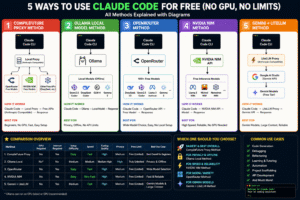
The 5 Free Methods at a Glance
| Method | No GPU | Beginner Friendly | Speed | Privacy | Truly Free |
|---|---|---|---|---|---|
| NIM Proxy (CompileFuture) | ✅ | ⚠️ Moderate | Fast | Low | ⚠️ Rate-limited |
| Ollama Local | ✅ (CPU-only) | ❌ Hard | Slow–Medium | ✅ High | ✅ Yes |
| OpenRouter | ✅ | ✅ Easy | Medium | Low | ⚠️ Very limited |
| NVIDIA NIM Direct | ✅ | ✅ Easy | Fast | Low | ⚠️ Rate-limited |
| Gemini + LiteLLM | ✅ | ⚠️ Moderate | Fast | Low | ⚠️ Daily caps |
Now let’s go deep on each one.
Method 1: The NIM Proxy Method
Overview
This is the method popularized by the CompileFuture YouTube channel, and for most developers it’s the best starting point. Here’s how it works:
You clone a lightweight proxy server onto your machine. This proxy speaks the Anthropic API format on one side (what Claude Code expects) and forwards requests to NVIDIA NIM’s free cloud API on the other side. Claude Code sends requests to localhost:8082, the proxy translates them, NVIDIA’s servers do the actual inference, and the response comes back.
The result: Claude Code works normally, backed by genuinely powerful free cloud models, with no local GPU required.
Is it truly free? Free, with limits. NVIDIA NIM’s free tier provides a monthly credit allotment — enough for comfortable daily development, but not infinite. Heavy automated sessions will exhaust it.
Is it truly unlimited? No. ~40 requests per minute rate limit. Monthly credit cap. But for normal coding workflows, you’ll rarely hit the minute-level limit.
Requires GPU? No. All inference happens on NVIDIA’s data center hardware.
Requires local inference? No.
Best For
- Developers who want the best balance of quality and zero cost
- Anyone with a normal laptop (8GB+ RAM)
- Developers comfortable running a background server process
- Daily development workflows
Pros
- Fast inference (NVIDIA’s infrastructure is excellent)
- Good model quality (Qwen2.5-Coder-32B, GLM-4.5 are legitimately capable)
- No local GPU required
- Supports multiple model backends (NIM + OpenRouter + DeepSeek)
- Active community maintenance of the proxy repo
Cons
- Monthly credit cap on NVIDIA NIM free tier
- Requires phone number verification for NVIDIA account
- Third-party proxy — not officially supported by Anthropic
- Your code is sent to NVIDIA’s servers
- Proxy must be running in background at all times
- Model selection on the free tier can change without notice
Requirements
- RAM: 4GB minimum (the proxy is lightweight)
- GPU: Not required
- OS: Windows, macOS, Linux
- Internet: Required (always)
- Accounts needed: NVIDIA Developer account (free), optionally OpenRouter
- Python: 3.10+ (via
uv) - Git: Required to clone the repo
Method 2: Ollama Local Model Method
Overview
Ollama is the most popular tool for running AI models locally. It downloads models to your machine and runs inference entirely on your CPU or GPU — no internet required during use, no API keys, no rate limits.
The integration with Claude Code works by running Ollama’s API server (which speaks the OpenAI API format) and using a compatibility shim to translate to the Anthropic format Claude Code expects.
Is it truly free? Yes — after downloading the model, there are no ongoing costs.
Is it truly unlimited? Yes — your only limit is your hardware’s speed and patience.
Requires GPU? No, but having one dramatically improves speed.
Requires local inference? Yes — this IS the local inference method.
The Hardware Reality Check
This is where most YouTube tutorials mislead you. They demo on a $4,000 Mac Studio with 128GB unified memory. Here’s what local inference actually looks like across real hardware:
| Hardware | Model Size | Speed | Quality |
|---|---|---|---|
| 8GB RAM laptop (CPU) | 7B max | 2–5 tok/s | Poor for coding |
| 16GB RAM laptop (CPU) | 13B | 3–8 tok/s | Fair |
| 32GB RAM laptop (CPU) | 34B | 2–5 tok/s | Good |
| M3 Pro, 36GB unified | 34B | 15–25 tok/s | Good |
| RTX 4090 (24GB VRAM) | 34B | 40–70 tok/s | Good |
| 64GB RAM, no GPU | 70B | 1–3 tok/s | Strong (but glacial) |
| M2 Ultra, 192GB unified | 70B+ | 20–35 tok/s | Excellent |
Honest conclusion: For most people with a standard laptop, local models are frustratingly slow and not capable enough for serious coding tasks. If you have 32GB+ RAM or a dedicated GPU, the story changes considerably.
Best For
- Developers with powerful hardware (32GB+ RAM or dedicated GPU)
- Privacy-critical work (proprietary code, NDA projects)
- Offline development (no internet access)
- Developers who want zero ongoing API costs and have the hardware to support it
Pros
- Complete privacy — code never leaves your machine
- No rate limits, no monthly caps, no API keys
- Works offline after initial model download
- Fully reproducible — same model behaves the same way
- No accounts required
Cons
- Slow on most consumer hardware
- Significant quality gap versus top cloud models on smaller hardware
- Models occupy 4–40GB of disk space
- Complex to configure well for Claude Code
- Quantized models sacrifice accuracy for speed
- No streaming benefits — long waits between responses
Requirements
- RAM: 16GB minimum (8GB possible but poor experience)
- GPU: Optional but strongly recommended (NVIDIA or Apple Silicon)
- Disk space: 5–40GB per model
- OS: Windows, macOS, Linux
- Internet: Only needed for initial model download
Method 3: OpenRouter Free API Method
Overview
OpenRouter is a unified API gateway that routes requests to dozens of AI providers. It maintains a selection of genuinely free models — subsidized by the platform, usable without payment.
You don’t need a proxy server for this method. You just point Claude Code at OpenRouter’s API endpoint with your key, and Claude Code works through OpenRouter’s routing layer.
Is it truly free? Free, with strict rate limits. The free tier is heavily throttled — often 10–20 requests per day on the most capable free models. Adding even $1 to your account significantly improves access.
Is it truly unlimited? No — this is the most rate-limited of all cloud methods.
Requires GPU? No.
Requires local inference? No.
Best For
- Absolute beginners who want the simplest possible setup
- Light experimentation and learning
- Developers who just want to try Claude Code before committing to a more complex setup
- Users who add $5–$10 to their account for better reliability
Pros
- Simplest setup of any method — 5 minutes from zero to working
- No proxy server to maintain
- Access to a wide variety of models
- Single API key works across many model providers
- Good documentation
Cons
- Free tier limits are genuinely restrictive (often 10–20 requests/day for good models)
- Free model catalog changes frequently
- Peak-hour congestion can cause failures and slow responses
- OpenRouter can deprecate or remove free models without much notice
- Context windows on free tier may be shorter
Requirements
- RAM: None (just a computer and internet)
- GPU: None
- OS: Any
- Internet: Required
- Accounts: OpenRouter free account
- API keys: OpenRouter API key (free)
Method 4: NVIDIA NIM Direct Method
Overview
NVIDIA NIM (Inference Microservices) is NVIDIA’s cloud platform for running AI models on their GPU infrastructure. They offer a free tier that lets you call powerful models without any local setup beyond environment variable configuration.
Unlike the NIM Proxy method (Method 1), this approach doesn’t use a local proxy server. You configure Claude Code to talk directly to NVIDIA’s API — but since NVIDIA uses OpenAI-compatible APIs rather than Anthropic’s format, you need a lightweight translation layer (usually handled by setting specific environment variables or a minimal proxy).
Is it truly free? Free up to monthly credit limits. NVIDIA is fairly generous — enough for daily coding — but heavy automated sessions will exhaust the free allotment before month-end.
Is it truly unlimited? No. ~40 requests/minute rate limit. Monthly token budget.
Requires GPU? No.
Best For
- Developers who want a clean, minimal setup without running a full proxy server
- Users already familiar with environment variable configuration
- Developers who want NVIDIA’s fast infrastructure without the full proxy complexity
Pros
- Fast inference (NVIDIA’s data center GPUs)
- High-quality models on the free tier (Qwen2.5-Coder-32B, Nemotron)
- More stable than OpenRouter’s free tier
- Good documentation
Cons
- Monthly credit limit
- Phone number required for account verification
- Slight complexity around API format translation
- Your code is sent to NVIDIA’s servers
Requirements
- RAM: 4GB (just your browser and terminal)
- GPU: None
- OS: Any
- Internet: Required
- Accounts: NVIDIA Developer account (free, phone verification required)
Method 5: Gemini + LiteLLM Proxy Method
Overview
Google’s Gemini models are available through Google AI Studio with the most generous free tier of any major provider — up to 1,500 requests per day on Gemini 2.0 Flash (as of 2026). Gemini 2.5 Pro is also available on a free experimental tier with lower limits.
The catch: Google’s API doesn’t speak Anthropic’s format. LiteLLM acts as a translation proxy — it accepts Anthropic-format requests from Claude Code and converts them to Gemini API calls.
Gemini 2.0 Flash has a 1 million token context window, which is exceptional — great for feeding large codebases into Claude Code.
Is it truly free? Free up to daily request limits. 1,500 requests/day on Flash is very generous for interactive coding.
Is it truly unlimited? No — daily caps exist. For normal coding sessions (not automated batch runs), you’ll rarely hit 1,500 requests in a day.
Requires GPU? No.
Best For
- Developers who need large context windows (big codebases)
- Users who want the strongest model quality on a free tier (Gemini 2.5 Pro)
- Developers who already have a Google account and want minimal new account setup
- Teams doing architecture work where reasoning quality matters
Pros
- Very generous free tier (1,500 req/day on Flash)
- 1M token context window on Gemini Flash
- Gemini 2.5 Pro is legitimately excellent at coding
- Google’s infrastructure is fast and reliable
- Easy account setup (uses existing Google account)
Cons
- LiteLLM adds setup complexity
- Translation layer isn’t perfect — some Claude Code features behave unexpectedly
- Gemini Pro’s free tier is more restricted than Flash
- Daily request limits reset at midnight (UTC)
- Your code is sent to Google’s servers
Requirements
- RAM: 4GB+ (for LiteLLM process)
- GPU: None
- OS: Any (with Python)
- Internet: Required
- Accounts: Google account (free)
- Python: 3.8+
Best Method Analysis — Honest Answers
Easiest Method
Winner: OpenRouter
Five-minute setup. One API key. No proxy, no local server, no configuration files. If you’ve never done any of this before and want to see Claude Code working in the next 10 minutes, start here.
Fastest Method
Winner: Gemini 2.0 Flash (via LiteLLM)
Gemini Flash produces responses faster than any other free tier option. NVIDIA NIM is close behind, and both are considerably faster than local Ollama setups on standard hardware.
Best Coding Quality
Winner: Gemini 2.5 Pro (via LiteLLM) — or NVIDIA NIM with Qwen2.5-Coder-32B
Gemini 2.5 Pro’s reasoning capabilities make it the strongest free option for complex architectural work, debugging hard problems, and understanding unfamiliar codebases. Qwen2.5-Coder-32B on NVIDIA NIM is the runner-up and is more reliably available on the free tier.
Best for Weak Laptops
Winner: OpenRouter or NVIDIA NIM
Both are entirely cloud-side — your laptop does essentially nothing beyond running a browser and terminal. RAM requirement is effectively just what your OS needs (4GB is fine). If your laptop struggles to run a local proxy server, OpenRouter wins since it requires the fewest local processes.
Best for Privacy
Winner: Ollama
And it’s not close. With Ollama, your code never leaves your machine. Every other method in this list sends your code to a third-party server — NVIDIA’s, Google’s, or OpenRouter’s partners. For proprietary code, NDA-covered projects, or security-sensitive work, Ollama is the only honest answer. Accept the performance tradeoffs or invest in better hardware.
Best Truly Unlimited Method
Winner: Ollama (if you have the hardware)
Zero rate limits. Zero API credits. Your only limit is your machine’s speed. If “unlimited” matters to you — because you run automated coding sessions, batch processing, or 8-hour development marathons — Ollama is the only option without a cap somewhere.
Among cloud methods, Gemini Flash’s 1,500 requests/day is the most generous free tier and the closest to “effectively unlimited” for interactive use. Most developers don’t send 1,500 messages in a day.
Best for Beginners
Winner: OpenRouter (for setup), NIM Proxy (for sustained use)
OpenRouter wins on first-setup simplicity. But its rate limits will frustrate you within a few days of serious use. For beginners who want something that keeps working — the NIM Proxy method is worth the extra 15 minutes of setup. It’s more stable, faster, and higher quality.
Best Overall Method
Winner: NIM Proxy
It offers the best balance of: quality, speed, reliability, and zero ongoing cost. The 20-minute setup is a reasonable one-time investment. NVIDIA’s infrastructure is faster than local inference on most hardware. The model quality (Qwen2.5-Coder-32B, Nemotron) is genuinely good. For the vast majority of developers on normal laptops who want free Claude Code that actually works for daily development — this is the recommendation.
Runner-up: Gemini + LiteLLM, especially for developers working with large codebases (1M context) or who want stronger reasoning quality.
Master Comparison Table
| Feature | NIM Proxy | Ollama Local | OpenRouter | NVIDIA NIM Direct | Gemini + LiteLLM |
|---|---|---|---|---|---|
| Cost | Free | Free | Free | Free | Free |
| GPU Required | ❌ No | ❌ No (helps) | ❌ No | ❌ No | ❌ No |
| RAM Required | 4GB | 16–64GB | 4GB | 4GB | 4GB |
| Internet Required | ✅ Always | After setup | ✅ Always | ✅ Always | ✅ Always |
| Setup Difficulty | ⭐⭐ Medium | ⭐⭐⭐ Hard | ⭐ Easy | ⭐⭐ Medium | ⭐⭐ Medium |
| Setup Time | ~20 min | 30–120 min | ~5 min | ~15 min | ~25 min |
| Speed | 🟢 Fast | 🔴 Slow–Med | 🟡 Medium | 🟢 Fast | 🟢 Very Fast |
| Coding Quality | 🟡 Good | 🔴 Fair–Good | 🟡 Fair | 🟡 Good | 🟢 Very Good |
| Privacy | 🔴 Low (NVIDIA) | 🟢 High (local) | 🔴 Low | 🔴 Low (NVIDIA) | 🔴 Low (Google) |
| Rate Limits | ~40 req/min | None | Strict | ~40 req/min | 1500/day |
| Monthly Caps | ✅ Yes | ❌ No | ✅ Yes | ✅ Yes | ❌ No (daily) |
| Offline Support | ❌ No | ✅ Yes | ❌ No | ❌ No | ❌ No |
| Context Window | Up to 128K | Model-dep. | Model-dep. | Up to 128K | Up to 1M |
| Reliability | 🟢 High | 🟢 High | 🔴 Variable | 🟢 High | 🟢 High |
| Beginner Friendly | 🟡 Moderate | 🔴 No | 🟢 Yes | 🟡 Moderate | 🟡 Moderate |
| Phone Verification | ✅ Required | ❌ No | ❌ No | ✅ Required | ❌ No |
| Best Use Case | Daily coding | Privacy/offline | Quick start | Daily coding | Large codebases |