JOINs are used to combine rows from two or more tables based on a related column between them. They help retrieve meaningful data from multiple tables.

1. INNER JOIN – Matching Records in Both Tables

Returns only the rows that have matching values in both tables.

Syntax:

SELECT columns
FROM table1
INNER JOIN table2
ON table1.common_column = table2.common_column;

Example:

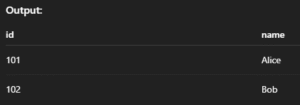
SELECT orders.id, customers.name
FROM orders
INNER JOIN customers ON orders.customer_id = customers.id;

Output: 
2. LEFT JOIN (or LEFT OUTER JOIN) – All from Left + Matches from Right

Returns all rows from the left table, and matched rows from the right. If no match, returns NULL.

Syntax:

SELECT columns
FROM table1
LEFT JOIN table2
ON table1.common_column = table2.common_column;

Example:

SELECT customers.name, orders.id
FROM customers
LEFT JOIN orders ON customers.id = orders.customer_id;

Output: 

3. RIGHT JOIN (or RIGHT OUTER JOIN) – All from Right + Matches from Left

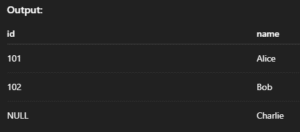
Returns all rows from the right table, and matched ones from the left. If no match, fills with NULL.

Syntax:

SELECT columns
FROM table1
RIGHT JOIN table2
ON table1.common_column = table2.common_column;

Example:

SELECT orders.id, customers.name
FROM orders
RIGHT JOIN customers ON orders.customer_id = customers.id;

Output: 

4. FULL JOIN / FULL OUTER JOIN – All from Both Tables

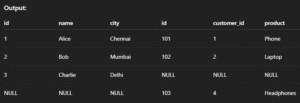
Returns all records when there is a match in either the left or right table. Non-matching rows will have NULL.

Syntax:

SELECT columns
FROM table1
LEFT JOIN table2 ON table1.common_column = table2.common_column
UNION
SELECT columns
FROM table1
RIGHT JOIN table2 ON table1.common_column = table2.common_column;

Example:

SELECT *
FROM customers
LEFT JOIN orders ON customers.id = orders.customer_id
UNION
SELECT *
FROM customers
RIGHT JOIN orders ON customers.id = orders.customer_id;

Output: 

5. CROSS JOIN – All Possible Combinations

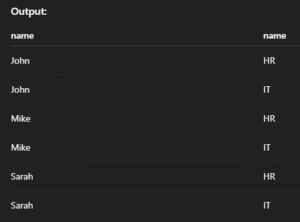
Returns the Cartesian product of two tables — every row in the first table is combined with every row in the second.

Syntax:

SELECT columns
FROM table1
CROSS JOIN table2;

Example:

SELECT employees.name, departments.name
FROM employees
CROSS JOIN departments;

Output: 

6. SELF JOIN – Join a Table to Itself

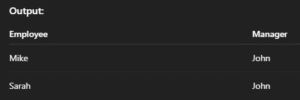
Used when you want to compare rows in the same table. You use aliases to treat one table like two.

Syntax:

SELECT A.column1, B.column2
FROM table_name AS A
JOIN table_name AS B
ON A.related_column = B.related_column;

Example:

SELECT A.name AS Employee, B.name AS Manager
FROM employees A
JOIN employees B ON A.manager_id = B.id;

Output: 

7. NATURAL JOIN – Auto-Match Columns with Same Name

Automatically joins tables on columns with the same name and compatible data types — no ON clause required.

Syntax:

SELECT columns
FROM table1
NATURAL JOIN table2;

Example:

SELECT *
FROM students
NATURAL JOIN marks;

Output: