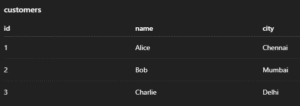
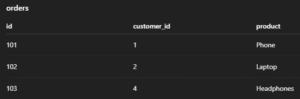
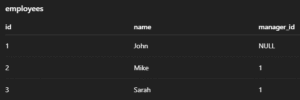
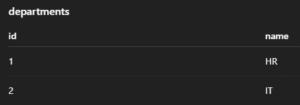
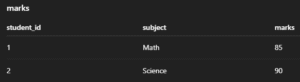
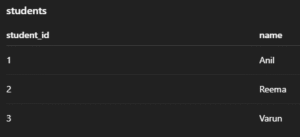
The sample tables used in the following examples are:-

1. Customer Table

2. Order Table

3. Employee Table

4. Department Table

5. Marks Table

6. Student Table

1. INSERT INTO – Add New Records

Inserts new rows into a table. Values can be inserted into all or selected columns.

Syntax:

INSERT INTO table_name (column1, column2, ...)
VALUES (value1, value2, ...);

Example:

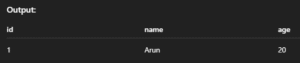
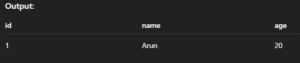
INSERT INTO students (id, name, age) VALUES (1, 'Arun', 20);

Output: 

2. INSERT IGNORE – Skip Duplicates Silently

Inserts data but skips the row if it violates uniqueness constraints like PRIMARY KEY.

Syntax:

INSERT IGNORE INTO table_name (column1, column2, ...)
VALUES (value1, value2, ...);

Example:

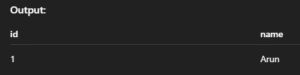
INSERT IGNORE INTO students (id, name) VALUES (1, 'Arun');

Output: 

3. INSERT … ON DUPLICATE KEY UPDATE – Upsert

If a duplicate key is found, updates the row instead of inserting a new one.

Syntax:

INSERT INTO table_name (column1, column2)
VALUES (value1, value2)
ON DUPLICATE KEY UPDATE column2 = new_value;

Example:

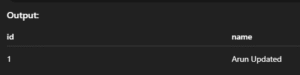
INSERT INTO students (id, name) VALUES (1, 'Arun')
ON DUPLICATE KEY UPDATE name = 'Arun Updated';

Output:

4. SELECT – Read Data from Table

Retrieves data from one or more tables. You can select specific columns or all (*).

Syntax:

SELECT column1, column2 FROM table_name;
-- OR
SELECT * FROM table_name;

Example:

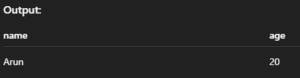
SELECT name, age FROM students;

Output: 

5. SELECT DISTINCT – Avoid Duplicate Rows

Returns only unique records from the selected column(s).

Syntax:

SELECT DISTINCT column_name FROM table_name;

Example:

SELECT DISTINCT age FROM students;

Output: 

6. SELECT WHERE – Conditional Read

Filters records based on a given condition.

Syntax:

SELECT column1, column2 FROM table_name WHERE condition;

Example:

SELECT * FROM students WHERE age > 18;

Output: 

7. SELECT ORDER BY – Sort Results

Sorts the output in ascending (ASC) or descending (DESC) order.

Syntax:

SELECT * FROM table_name ORDER BY column_name ASC|DESC;

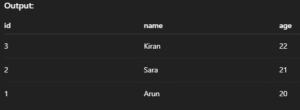
Example:

SELECT * FROM students ORDER BY age DESC;

Output: 

8. SELECT LIMIT – Limit Output Rows

Fetches only a fixed number of rows from the result.

Syntax:

SELECT * FROM table_name LIMIT number_of_rows;

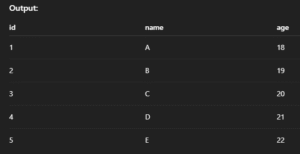
Example:

SELECT * FROM students LIMIT 5;

Output: 

9. SELECT LIKE – Pattern Matching

Finds rows where column values match a specific pattern using % or _.

Syntax:

SELECT * FROM table_name WHERE column_name LIKE 'pattern';

Example:

SELECT * FROM students WHERE name LIKE 'A%';

Output: 

10. UPDATE – Change Existing Data

Updates values in one or more columns for selected rows.

Syntax:

UPDATE table_name
SET column1 = value1, column2 = value2
WHERE condition;

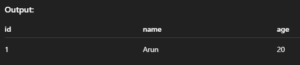
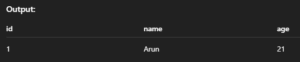
Example:

UPDATE students SET age = 21 WHERE id = 1;

Output: 

11. UPDATE with JOIN – Modify Using Related Tables

Allows updates based on matching rows in other tables.

Syntax:

UPDATE table1
JOIN table2 ON table1.column = table2.column
SET table1.column_to_update = value
WHERE condition;

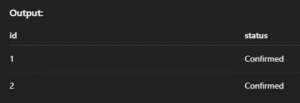
Example:

UPDATE orders o
JOIN customers c ON o.customer_id = c.id
SET o.status = 'Confirmed'
WHERE c.city = 'Chennai';

Output: 

12. DELETE – Remove Data from Table

Deletes rows matching a condition from a table.

Syntax:

DELETE FROM table_name WHERE condition;

Example:

DELETE FROM students WHERE id = 1;

Output: 

13. DELETE with JOIN – Delete from Multiple Tables

Allows deleting rows based on matching conditions in another table.

Syntax:

DELETE alias1 FROM table1 AS alias1
JOIN table2 AS alias2 ON alias1.column = alias2.column
WHERE condition;

Example:

DELETE s FROM students s
JOIN dropped_list d ON s.id = d.student_id;

Output: 

14. REPLACE INTO – Insert or Replace Row

Inserts a row or replaces the existing row with the same primary key.

Syntax:

REPLACE INTO table_name (column1, column2, ...) VALUES (value1, value2, ...);

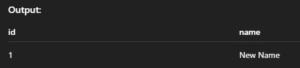
Example:

REPLACE INTO students (id, name) VALUES (1, 'New Name');

Output: 

15. TRUNCATE – Delete All Data (Preserve Table)

Removes all rows from a table quickly but keeps its structure.

Syntax:

TRUNCATE TABLE table_name;

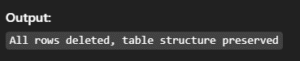
Example:

TRUNCATE TABLE students;

Output: 

16. SELECT INTO OUTFILE – Export Query Result to File

Saves the result of a SELECT query into a file on the server.

Syntax:

SELECT * FROM table_name INTO OUTFILE '/path/to/file.csv';

Example:

SELECT * FROM students INTO OUTFILE '/tmp/students.csv';

Output: 

17. LOAD DATA INFILE – Import Data from File

Loads data from a file directly into a MySQL table.

Syntax:

LOAD DATA INFILE '/path/to/file.csv' INTO TABLE table_name
FIELDS TERMINATED BY ',' ENCLOSED BY '"' LINES TERMINATED BY 'n';

Example:

LOAD DATA INFILE '/tmp/students.csv' INTO TABLE students;

Output: