Launch your tech mastery with us—your coding journey starts now!
Course Content
MySQL Tutorial
Welcome to the MySQL tutorial — crafted for everyone, whether you're taking your first steps into the world of databases or you're a developer looking to refine your skills with advanced MySQL techniques. From understanding the fundamentals of relational data to mastering complex SQL queries, transactions, stored procedures, and performance tuning — this guide has you covered.
0/6
MySQL Environmental Setup
Setting up MySQL is the first step toward working with relational databases. Below is a complete guide to help you install and run MySQL on your system, whether you are using Windows, Linux, or macOS. The second step is to start and stop MySQL service on your system. This ensures the MySQL server is running and ready to accept connections and execute queries.
0/2
MySQL Basics
SQL (Structured Query Language) is the standard language used to communicate with relational databases like MySQL. It allows you to create, modify, manage, and retrieve data from tables using simple and powerful commands.
0/5
MySQL Crud Operations
CRUD stands for Create, Read, Update, and Delete — the basic operations you perform on data in any MySQL database. These operations allow you to insert new records, retrieve data, update existing values, and remove records when needed.
0/1
MySQL Joins
In MySQL, JOINs are used to combine rows from two or more tables based on related columns. They are essential when your data is spread across multiple tables and you need to bring it together in one query result.
0/1
Stored Procedures & Functions in MySQL
This section explains the concepts of stored procedures and user-defined functions (UDFs) in MySQL, covering their creation, usage, parameters, differences, control flow, determinism, and advanced behavior — nothing is skipped.
0/6
MySQL Triggers
This section covers everything about Triggers and Events in MySQL — including what they are, how they work, when to use them, all the types available, and how to manage them. Each point comes with simple explanations and examples.
0/4
User Management and Security in MySQL
Managing users and securing your MySQL server is essential to control access, protect data, and prevent unauthorized operations. MySQL provides powerful tools to handle users, assign roles, and enforce fine-grained access control using privileges.
0/2
MySQL Performance Tuning
MySQL Performance Tuning is the process of optimizing how your database server, queries, indexes, and schema work together to provide the fastest and most resource-efficient responses. When a database starts to slow down under load, tuning ensures better speed, reduced CPU/memory usage, and quicker access to data — especially for high-traffic applications or large datasets. It involves query optimization, proper indexing, schema design, and server-level configurations that reduce delays and improve efficiency across all operations.
0/8
Query Optimization Techniques in MySQL
Query optimization is the process of writing SQL queries in a way that minimizes execution time and resource usage (like CPU, memory, and disk I/O). MySQL’s optimizer decides the best way to execute your SQL query, but your query structure can drastically impact performance. By following smart query practices, using indexes, avoiding expensive operations, and understanding how MySQL executes your statements, you can dramatically boost your database performance.
0/1
Replication in MySQL
0/1
MySQL

JOINs are used to combine rows from two or more tables based on a related column between them. They help retrieve meaningful data from multiple tables.

1. INNER JOIN – Matching Records in Both Tables

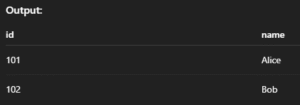
Returns only the rows that have matching values in both tables.

Syntax:

SELECT columns
FROM table1
INNER JOIN table2
ON table1.common_column = table2.common_column;

Example:

SELECT orders.id, customers.name
FROM orders
INNER JOIN customers ON orders.customer_id = customers.id;

Output: 
2. LEFT JOIN (or LEFT OUTER JOIN) – All from Left + Matches from Right

Returns all rows from the left table, and matched rows from the right. If no match, returns NULL.

Syntax:

SELECT columns
FROM table1
LEFT JOIN table2
ON table1.common_column = table2.common_column;

Example:

SELECT customers.name, orders.id
FROM customers
LEFT JOIN orders ON customers.id = orders.customer_id;

Output: 

3. RIGHT JOIN (or RIGHT OUTER JOIN) – All from Right + Matches from Left

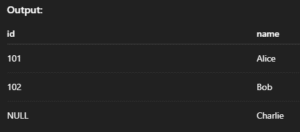
Returns all rows from the right table, and matched ones from the left. If no match, fills with NULL.

Syntax:

SELECT columns
FROM table1
RIGHT JOIN table2
ON table1.common_column = table2.common_column;

Example:

SELECT orders.id, customers.name
FROM orders
RIGHT JOIN customers ON orders.customer_id = customers.id;

Output: 
4. FULL JOIN / FULL OUTER JOIN – All from Both Tables

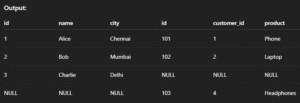
Returns all records when there is a match in either the left or right table. Non-matching rows will have NULL.

Syntax:

SELECT columns
FROM table1
LEFT JOIN table2 ON table1.common_column = table2.common_column
UNION
SELECT columns
FROM table1
RIGHT JOIN table2 ON table1.common_column = table2.common_column;

Example:

SELECT *
FROM customers
LEFT JOIN orders ON customers.id = orders.customer_id
UNION
SELECT *
FROM customers
RIGHT JOIN orders ON customers.id = orders.customer_id;

Output: 
5. CROSS JOIN – All Possible Combinations

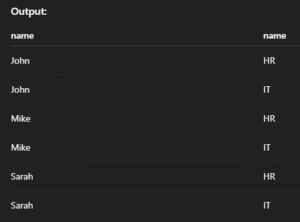
Returns the Cartesian product of two tables — every row in the first table is combined with every row in the second.

Syntax:

SELECT columns
FROM table1
CROSS JOIN table2;

Example:

SELECT employees.name, departments.name
FROM employees
CROSS JOIN departments;

Output: 
6. SELF JOIN – Join a Table to Itself

Used when you want to compare rows in the same table. You use aliases to treat one table like two.

Syntax:

SELECT A.column1, B.column2
FROM table_name AS A
JOIN table_name AS B
ON A.related_column = B.related_column;

Example:

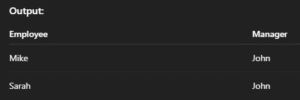
SELECT A.name AS Employee, B.name AS Manager
FROM employees A
JOIN employees B ON A.manager_id = B.id;

Output: 
7. NATURAL JOIN – Auto-Match Columns with Same Name

Automatically joins tables on columns with the same name and compatible data types — no ON clause required.

Syntax:

SELECT columns
FROM table1
NATURAL JOIN table2;

Example:

SELECT *
FROM students
NATURAL JOIN marks;

Output: