JOINs are used to combine rows from two or more tables based on a related column between them. They help retrieve meaningful data from multiple tables.
1. INNER JOIN – Matching Records in Both Tables
Returns only the rows that have matching values in both tables.
Syntax:
SELECT columns
FROM table1
INNER JOIN table2
ON table1.common_column = table2.common_column;
Example:
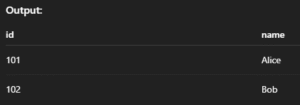
SELECT orders.id, customers.name
FROM orders
INNER JOIN customers ON orders.customer_id = customers.id;
Output:

2. LEFT JOIN (or LEFT OUTER JOIN) – All from Left + Matches from Right
Returns all rows from the left table, and matched rows from the right. If no match, returns NULL.
Syntax:
SELECT columns
FROM table1
LEFT JOIN table2
ON table1.common_column = table2.common_column;
Example:
SELECT customers.name, orders.id
FROM customers
LEFT JOIN orders ON customers.id = orders.customer_id;
Output:

3. RIGHT JOIN (or RIGHT OUTER JOIN) – All from Right + Matches from Left
Returns all rows from the right table, and matched ones from the left. If no match, fills with NULL.
Syntax:
SELECT columns
FROM table1
RIGHT JOIN table2
ON table1.common_column = table2.common_column;
Example:
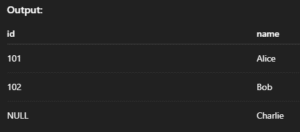
SELECT orders.id, customers.name
FROM orders
RIGHT JOIN customers ON orders.customer_id = customers.id;
Output:
4. FULL JOIN / FULL OUTER JOIN – All from Both Tables
Returns all records when there is a match in either the left or right table. Non-matching rows will have NULL.
Syntax:
SELECT columns
FROM table1
LEFT JOIN table2 ON table1.common_column = table2.common_column
UNION
SELECT columns
FROM table1
RIGHT JOIN table2 ON table1.common_column = table2.common_column;
Example:
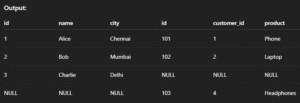
SELECT *
FROM customers
LEFT JOIN orders ON customers.id = orders.customer_id
UNION
SELECT *
FROM customers
RIGHT JOIN orders ON customers.id = orders.customer_id;
Output:

5. CROSS JOIN – All Possible Combinations
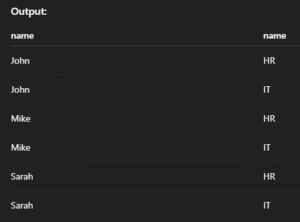
Returns the Cartesian product of two tables — every row in the first table is combined with every row in the second.
Syntax:
SELECT columns
FROM table1
CROSS JOIN table2;
Example:
SELECT employees.name, departments.name
FROM employees
CROSS JOIN departments;
Output:

6. SELF JOIN – Join a Table to Itself
Used when you want to compare rows in the same table. You use aliases to treat one table like two.
Syntax:
SELECT A.column1, B.column2
FROM table_name AS A
JOIN table_name AS B
ON A.related_column = B.related_column;
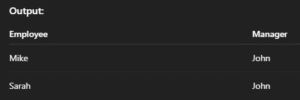
Example:
SELECT A.name AS Employee, B.name AS Manager
FROM employees A
JOIN employees B ON A.manager_id = B.id;
Output:

7. NATURAL JOIN – Auto-Match Columns with Same Name
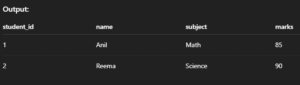
Automatically joins tables on columns with the same name and compatible data types — no ON clause required.
Syntax:
SELECT columns
FROM table1
NATURAL JOIN table2;
Example:
SELECT *
FROM students
NATURAL JOIN marks;
Output: