
Types of Queue
Queues come in various forms to solve different problems:
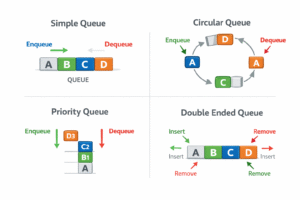
1. Simple Queue (Linear Queue)
The Simple Queue is the standard queue data structure that strictly follows the First In, First Out (FIFO) principle.
- How it works: You can only add elements (enqueue) at the Rear and remove elements (dequeue) from the Front.
- The Drawback: In an array-based implementation, once the queue is full, you cannot insert new elements even if you have dequeued items from the front (leaving empty, unusable spaces at the beginning of the array).
- Real-Life Example: Standing in a checkout line at a grocery store. The first person to line up is the first person served. If you join the line, you go to the very back.
- Technical Example: Print Spooling: When you send multiple documents to a printer, they are placed in a simple queue and printed in the exact order they were received.
- Call Center Systems: Customer calls are held in a queue until the next available agent can answer them.
2. Circular Queue (Ring Buffer)
A Circular Queue is an ingenious solution to the wasted memory problem found in Simple Queues.
- How it works: It still follows FIFO, but the last position in the queue is visually and logically connected back to the first position. When the rear reaches the end of the array, it “wraps around” to the beginning if there is empty space.
- The Advantage: It maximizes memory utilization by reusing empty spaces left by dequeued elements.
- Real-Life Example: A revolving door or a continuous bus route. As a bus reaches the “end” of its route, it simply loops back to the first stop, filling empty seats as passengers get off.
- Technical Example:
- Media Streaming Buffers: When you watch a YouTube video, the video data is loaded into a circular buffer. Once the video player reads a chunk of data, that space is freed up and overwritten by new incoming data.
- CPU Scheduling: Operating systems use a “Round Robin” scheduling algorithm where the CPU assigns a fixed time slice to processes in a circular loop.
3. Priority Queue
A Priority Queue abandons the strict FIFO rule. Instead, elements are served based on their priority level.
- How it works: Every element is associated with a priority value. When you dequeue, the element with the highest priority is removed first. If two elements have the same priority, they are usually served according to their arrival time (FIFO). Under the hood, this is most efficiently implemented using a Heap data structure.
- Real-Life Example: A hospital Emergency Room (Triage). Patients don’t get seen purely based on arrival time. Someone who arrives with a severe injury (high priority) will be treated immediately, bypassing someone who arrived earlier with a minor cough (low priority).
- Technical Example:
- Dijkstra’s Algorithm: Used in GPS routing to continuously find the next closest path (highest priority) when calculating the shortest distance between two cities.
- Operating System Interrupts: If the computer encounters a critical hardware error, the OS drops its current tasks to handle the high-priority error message immediately.
4. Double-Ended Queue (Deque)
A Deque (pronounced “deck”) provides the ultimate flexibility by allowing you to break the rules of standard queues.
- How it works: You can insert and delete elements from both the Front and the Rear. It essentially functions as a hybrid between a Stack and a Queue.
- Variations: Input-Restricted Deque: Deletion happens at both ends, but insertion is only allowed at one end.
- Output-Restricted Deque: Insertion happens at both ends, but deletion is only allowed at one end.
- Real-Life Example: Buying movie tickets where standard rules apply (join the back, leave from the front), but a VIP is allowed to jump straight to the front of the line, or someone at the very back gets tired of waiting and leaves the line from the rear.
- Technical Example:
- Undo/Redo Operations: Text editors use deques to store your recent typing history. If the history gets too full, the oldest actions are dropped from the “rear,” but you can continually undo/redo actions from the “front.”
- Web Browser History: Navigating back and forward between visited pages.