
Types of Arrays
Arrays are categorized based on the number of indices used to access elements.
A. One-Dimensional Array (1D)
A One-Dimensional Array (or 1D Array) is the simplest form of an array. It is a linear list of elements of the same type, stored in contiguous memory locations. You can imagine it as a single row of lockers, where each locker has a unique index number. 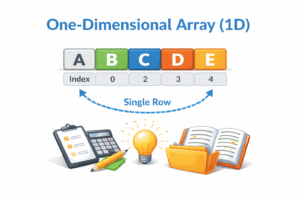
JavaPythonCC++
public class OneDimensionalArray {
    public static void main(String[] args) {
        // 1. Static Initialization (Declaration + Creation + Assignment)
        // Used when we already know the data
        int[] marks = {85, 90, 78, 92, 88};

        System.out.println("First student's mark: " + marks[0]); // Accessing index 0

        // 2. Dynamic Initialization (Declaration + Memory Allocation)
        // Used when we don't know the values yet
        String[] fruits = new String[4]; // Creates an empty array of size 4

        // Assigning values manually
        fruits[0] = "Apple";
        fruits[1] = "Banana";
        fruits[2] = "Mango";
        fruits[3] = "Orange";

        System.out.println("\nList of Fruits:");
        // Traversal using a for-loop
        for (int i = 0; i < fruits.length; i++) {
            System.out.println("Index " + i + ": " + fruits[i]);
        }

        // Traversal using Enhanced For-Loop (For-Each)
        System.out.println("\nMarks:");
        for (int m : marks) {
            System.out.print(m + " ");
        }
    }
}
# One Dimensional Array Example

# 1. Static Initialization
# Used when we already know the data
marks = [85, 90, 78, 92, 88]

print("First student's mark:", marks[0])  # Accessing index 0

# 2. Dynamic Initialization
# Used when we don't know the values yet
fruits = [None] * 4  # Creates an empty list of size 4

# Assigning values manually
fruits[0] = "Apple"
fruits[1] = "Banana"
fruits[2] = "Mango"
fruits[3] = "Orange"

print("\nList of Fruits:")
# Traversal using a for-loop
for i in range(len(fruits)):
    print("Index", i, ":", fruits[i])

# Traversal using For-Each style loop
print("\nMarks:")
for m in marks:
    print(m, end=" ")
#include <stdio.h>

int main() {

    // 1. Static Initialization (Declaration + Creation + Assignment)
    int marks[] = {85, 90, 78, 92, 88};

    printf("First student's mark: %d\n", marks[0]);

    // 2. Dynamic Initialization (Declaration + Memory Allocation)
    char *fruits[4];

    // Assigning values manually
    fruits[0] = "Apple";
    fruits[1] = "Banana";
    fruits[2] = "Mango";
    fruits[3] = "Orange";

    printf("\nList of Fruits:\n");

    // Traversal using a for-loop
    for (int i = 0; i < 4; i++) {
        printf("Index %d: %s\n", i, fruits[i]);
    }

    printf("\nMarks:\n");

    for (int i = 0; i < 5; i++) {
        printf("%d ", marks[i]);
    }

    return 0;
}
#include <iostream>
using namespace std;

int main() {

    // 1. Static Initialization (Declaration + Creation + Assignment)
    int marks[] = {85, 90, 78, 92, 88};

    cout << "First student's mark: " << marks[0] << endl;

    // 2. Dynamic Initialization (Declaration + Memory Allocation)
    string fruits[4];

    // Assigning values manually
    fruits[0] = "Apple";
    fruits[1] = "Banana";
    fruits[2] = "Mango";
    fruits[3] = "Orange";

    cout << "\nList of Fruits:" << endl;

    // Traversal using a for-loop
    for (int i = 0; i < 4; i++) {
        cout << "Index " << i << ": " << fruits[i] << endl;
    }

    // Traversal similar to For-Each
    cout << "\nMarks:" << endl;

    for (int m : marks) {
        cout << m << " ";
    }

    return 0;
}
- Analogy: A row of lockers in a school hallway.
- Use Case: Storing a list of student marks or daily temperatures.
B. Multi-Dimensional Array (2D, 3D)
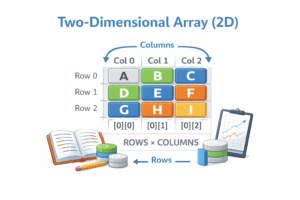
Arrays within arrays. The most common is the 2D Array (Matrix).
JavaPythonCC++
public class TwoDimensionalArray {
    public static void main(String[] args) {
        // Declaration: int[rows][columns]
        // Example: A 3x3 Matrix
        int[][] matrix = {
            {1, 2, 3}, // Row 0
            {4, 5, 6}, // Row 1
            {7, 8, 9}  // Row 2
        };

        System.out.println("Element at Row 1, Column 2 (Index 1,2): " + matrix[1][2]); // Output: 6

        System.out.println("\nDisplaying the 3x3 Matrix:");
        // Outer loop for Rows
        for (int i = 0; i < matrix.length; i++) {
            // Inner loop for Columns
            for (int j = 0; j < matrix[i].length; j++) {
                System.out.print(matrix[i][j] + " ");
            }
            System.out.println(); // New line after every row
        }
    }
}
# Two Dimensional Array Example

# Example: A 3x3 Matrix
matrix = [
    [1, 2, 3],  # Row 0
    [4, 5, 6],  # Row 1
    [7, 8, 9]   # Row 2
]

print("Element at Row 1, Column 2 (Index 1,2):", matrix[1][2])  # Output: 6

print("\nDisplaying the 3x3 Matrix:")

# Outer loop for Rows
for i in range(len(matrix)):
    # Inner loop for Columns
    for j in range(len(matrix[i])):
        print(matrix[i][j], end=" ")
    print()  # New line after every row
#include <stdio.h>

int main() {

    // Declaration of a 3x3 Matrix
    int matrix[3][3] = {
        {1, 2, 3}, // Row 0
        {4, 5, 6}, // Row 1
        {7, 8, 9}  // Row 2
    };

    printf("Element at Row 1, Column 2 (Index 1,2): %d\n", matrix[1][2]);

    printf("\nDisplaying the 3x3 Matrix:\n");

    // Outer loop for Rows
    for (int i = 0; i < 3; i++) {
        // Inner loop for Columns
        for (int j = 0; j < 3; j++) {
            printf("%d ", matrix[i][j]);
        }
        printf("\n"); // New line after every row
    }

    return 0;
}
#include <iostream>
using namespace std;

int main() {

    // Declaration of a 3x3 Matrix
    int matrix[3][3] = {
        {1, 2, 3}, // Row 0
        {4, 5, 6}, // Row 1
        {7, 8, 9}  // Row 2
    };

    cout << "Element at Row 1, Column 2 (Index 1,2): " << matrix[1][2] << endl;

    cout << "\nDisplaying the 3x3 Matrix:" << endl;

    // Outer loop for Rows
    for (int i = 0; i < 3; i++) {
        // Inner loop for Columns
        for (int j = 0; j < 3; j++) {
            cout << matrix[i][j] << " ";
        }
        cout << endl; // New line after every row
    }

    return 0;
}
- Analogy: A spreadsheet or a chessboard (Rows and Columns).
- Use Case: Storing an image (pixels), matrices, or tables.