
Hash Tables
Definition
A Hash Table (or Hash Map) is a data structure that stores data in “key-value” pairs. It is designed to find specific items instantly, without searching through the entire list.
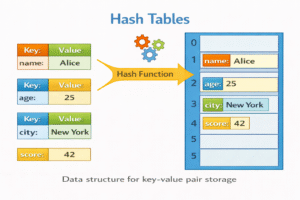
How it Works
- The Key: You have a piece of data you want to store (e.g., a username “Alice”).
- The Hash Function: This is a mathematical formula that converts the key (“Alice”) into a specific number (an index), like 42.
- Storage: The value associated with “Alice” is stored at index 42 in an array.
- Collisions: Sometimes, two different keys might generate the same index number. Hash tables handle this using techniques like “Chaining” (storing a list of items at that index).
Real-World Analogy:
Think of a public library. If you want a specific book, you don’t check every shelf. You look up the “Call Number” in the computer (the Hash Function). That number tells you exactly which shelf and row the book is on (the Index), so you can go straight there.
Example
Task: Store and retrieve phone numbers.
- Insert: Key=”John”, Value=555-0100. Hash(“John”) $\rightarrow$ Index 3. Store at Index 3.
- Search: Get number for “John”. Hash(“John”) $\rightarrow$ Index 3. Retrieve value.
Code Example
PythonJavaCC++
# Python Dictionaries are Hash Table implementation
phone_book = {}

# Insert
phone_book["John"] = "555-0100"
phone_book["Alice"] = "555-0101"

# Search / Access
print("John's Number:", phone_book["John"])  # Output: 555-0100

# Check existence
if "Bob" in phone_book:
    print("Bob is here")
else:
    print("Bob not found")  # Output: Bob not found
import java.util.HashMap;

public class HashTableExample {

    public static void main(String[] args) {

        // HashMap uses Hash Table internally
        HashMap<String, String> phoneBook = new HashMap<>();

        // Insert
        phoneBook.put("John", "555-0100");
        phoneBook.put("Alice", "555-0101");

        // Access
        System.out.println("John's Number: " + phoneBook.get("John"));

        // Check existence
        if (phoneBook.containsKey("Bob"))
            System.out.println("Bob is here");
        else
            System.out.println("Bob not found");
    }
}
#include <stdio.h>
#include <string.h>

#define SIZE 10

struct Entry {
    char key[20];
    char value[20];
};

struct Entry table[SIZE];

// Simple hash function
int hash(char* key) {
    return key[0] % SIZE;
}

// Insert
void insert(char* key, char* value) {

    int index = hash(key);

    strcpy(table[index].key, key);
    strcpy(table[index].value, value);
}

// Search
char* search(char* key) {

    int index = hash(key);

    if (strcmp(table[index].key, key) == 0)
        return table[index].value;

    return NULL;
}

int main() {

    insert("John", "555-0100");
    insert("Alice", "555-0101");

    printf("John's Number: %s\n", search("John"));

    if (search("Bob"))
        printf("Bob is here\n");
    else
        printf("Bob not found\n");

    return 0;
}
#include <iostream>
#include <unordered_map>
using namespace std;

int main() {

    // unordered_map is a hash table
    unordered_map<string, string> phoneBook;

    // Insert
    phoneBook["John"] = "555-0100";
    phoneBook["Alice"] = "555-0101";

    // Access
    cout << "John's Number: " << phoneBook["John"] << endl;

    // Check existence
    if (phoneBook.find("Bob") != phoneBook.end())
        cout << "Bob is here" << endl;
    else
        cout << "Bob not found" << endl;

    return 0;
}
Complexity Analysis
- Time Complexity:
- Average Case: O(1) (Instant access)
- Worst Case: O(n) (If many collisions occur—rare with good implementation)
- Space Complexity: O(n)
Use Cases
- Databases: Indexing data for fast retrieval.
- Caching: Storing recent web requests to load pages faster.
- Counting Frequencies: Counting how many times words appear in a text.