
Data Structures and Their Types
A Data Structure is a specialized format for organizing, processing, retrieving, and storing data. Choosing the right data structure can make your Java application run significantly faster.
Data structures can be classified into two main categories:
| Type | Description |
| Primitive | Basic data types: int, float, char, boolean |
| Non-Primitive | Complex structures: Arrays, Lists, Trees, Graphs |
Main Classification
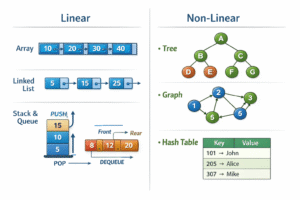
1. Linear Data Structures
In linear data structures, elements are arranged in a sequential manner where each element is connected to its previous and next element.
Think of it like: People standing in a line – one after another.
1.1 Array
Definition: A collection of elements of the same type stored at contiguous memory locations.
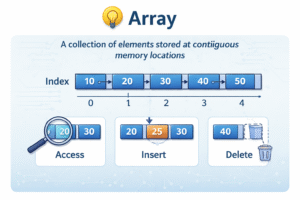
Real-Life Example: A row of mailboxes in an apartment building – each box has an address (index).
Key Features:
- Fixed size (cannot grow or shrink)
- Elements accessed using index (starts from 0)
- Fast access (O(1) time complexity)
- Insertion/deletion is slow (O(n) time)
Common Operations:
| Operation | Time Complexity | Description |
| Access | O(1) | Direct access by index |
| Search | O(n) | Linear search needed |
| Insertion | O(n) | Shifting elements required |
| Deletion | O(n) | Shifting elements required |
1.2 Linked List
Definition: A linear data structure where elements are stored in nodes, and each node points to the next node.
Real-Life Example: A treasure hunt where each clue leads to the next clue’s location.
Key Features:
- Dynamic size (can grow or shrink)
- Easy insertion/deletion (O(1) at beginning)
- No random access – must traverse from beginning
- Extra memory for storing pointers
Structure Visualization:
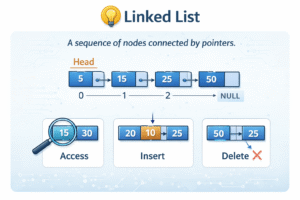
Types of Linked Lists:
| Type | Description |
| Singly Linked List | Each node points to next node only |
| Doubly Linked List | Each node has pointers to both next and previous nodes |
| Circular Linked List | Last node points back to the first node (forms a circle) |
1.3 Stack
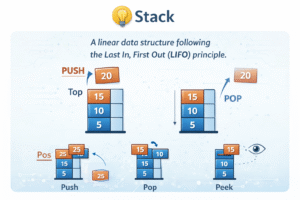
Definition: A linear data structure that follows LIFO (Last In First Out) principle.
Real-Life Example: Stack of plates – you add and remove from the top only.
Key Features:
- LIFO principle (Last In, First Out)
- Two main operations: Push (add) and Pop (remove)
- Access only from top
Operations:
- Push: Add element to top
- Pop: Remove element from top
- Peek: View top element without removing
- isEmpty: Check if stack is empty
Visualization:
Real-World Applications:
- Undo/Redo functionality in editors
- Browser back button
- Function call management (recursion)
- Expression evaluation (calculator)
1.4 Queue
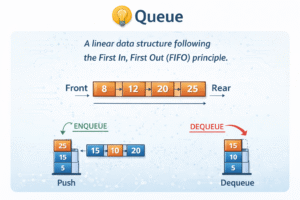
Definition: A linear data structure that follows FIFO (First In First Out) principle.
Real-Life Example: Queue at a ticket counter – first person in line gets served first.
Key Features:
- FIFO principle (First In, First Out)
- Two ends: Front (removal) and Rear (insertion)
- Main operations: Enqueue (add) and Dequeue (remove)
Visualization:
Real-World Applications:
- Print queue (documents waiting to be printed)
- CPU task scheduling
- Call center phone systems
- Breadth-First Search (BFS) in graphs
2. Non-Linear Data Structures
In non-linear data structures, elements are not arranged sequentially. Each element can be connected to multiple elements.
Think of it like: Family tree or road network – multiple connections from one point.
2.1 Tree
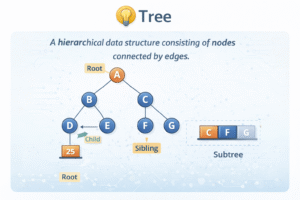
Definition: A hierarchical data structure consisting of nodes connected by edges, with one root node at the top.
Real-Life Example: Organization chart or family tree.
Key Terminologies:
- Root: Top node (no parent)
- Parent: Node that has children
- Child: Node below parent
- Leaf: Node with no children
- Height: Longest path from root to leaf
Visualization:
Binary Tree
Definition: A tree where each node has at most 2 children (left and right).
Real-World Applications:
- File systems (folders and files)
- HTML DOM (Document Object Model)
- Binary Search Trees (fast searching)
- Decision trees in AI/ML
2.2 Graph
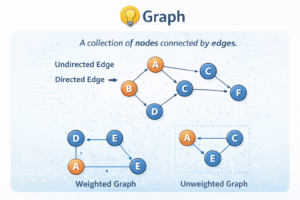
Definition: A non-linear data structure consisting of vertices (nodes) connected by edges.
Real-Life Example: Social media network (people connected as friends), road maps, flight routes.
Key Terminologies:
- Vertex: Node in the graph
- Edge: Connection between two vertices
- Degree: Number of edges connected to a vertex
- Path: Sequence of vertices connected by edges
Types of Graphs:
| Type | Description |
| Directed Graph | Edges have direction (A → B is different from B → A) |
| Undirected Graph | Edges have no direction (A — B means both ways) |
| Weighted Graph | Edges have weights/costs (distance, time, cost) |
Visualization:
Real-World Applications:
- Social networks (Facebook, LinkedIn connections)
- Google Maps (finding shortest routes)
- Recommendation systems
- Network routing protocols
3. Comparison of Data Structures
Here’s a quick comparison to help you choose the right data structure:
| Data Structure | Access | Search | Insert | Delete |
| Array | O(1) | O(n) | O(n) | O(n) |
| Linked List | O(n) | O(n) | O(1) | O(1) |
| Stack | O(n) | O(n) | O(1) | O(1) |
| Queue | O(n) | O(n) | O(1) | O(1) |
| Binary Tree | O(log n) | O(log n) | O(log n) | O(log n) |
When to Use Which Data Structure?
| Use This | When You Need |
| Array | Fixed size, fast access by index, less insertion/deletion |
| Linked List | Dynamic size, frequent insertion/deletion at beginning |
| Stack | LIFO operations (undo, backtracking, recursion) |
| Queue | FIFO operations (task scheduling, BFS) |
| Tree | Hierarchical data, fast search (BST), file systems |
| Graph | Networks, relationships, shortest paths |
4. Summary & Key Takeaways
- Data structures organize data for efficient operations
- Linear structures: Array, Linked List, Stack, Queue
- Non-linear structures: Tree, Graph
- Choose based on your needs: access speed, insertion/deletion frequency, memory
- Understanding time complexity helps pick the right structure