
Binary Trees
A Binary Tree is a tree where each node has at most two children, referred to as the left child and right child.
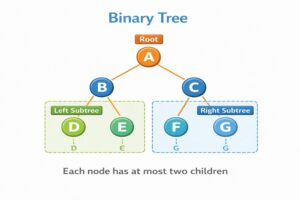
What is a Binary Tree?
A Binary Tree is a hierarchical data structure where every node has at most two children, strictly named the Left Child and the Right Child.
- Root: The topmost node where the tree begins.
- Leaf: A node with no children (the bottom of the tree).
- Edge: The connection between a parent node and a child node.
Real-Life Examples
- A Sports Tournament Bracket: A single-elimination bracket (like a tennis tournament), viewed top-down from the final champion to the initial matchups.
- A Decision Tree: A flowchart where every step asks a “Yes” or “No” question, branching you down two possible paths.
- A Family Tree: An ancestry chart where each person maps upward to exactly two parents.
Technical & Software Applications
- Data Compression: “Huffman coding” uses binary trees to build efficient codes for data compression, which is how .zip files are made.
- 3D Video Games: Binary Space Partitioning (BSP) trees help graphics engines quickly calculate which 3D objects should be rendered on your screen and which are hidden.
- Expression Evaluation: Compilers use binary expression trees to parse and solve mathematical equations (e.g., structuring A + B * C so the multiplication happens first).
Common Variations
- Binary Search Tree (BST): Highly organized for fast lookups. All left children are smaller than the parent, and all right children are larger.
- Full Binary Tree: Every node has either 0 or 2 children. There are no single-child nodes.
- Complete Binary Tree: Every level is completely filled, except possibly the bottom level, which must be filled strictly from left to right.
- Perfect Binary Tree: A completely symmetrical tree where every internal node has 2 children and all leaves are on the exact same bottom level.
Time and Space Complexity
(Assuming a balanced Binary Search Tree)
- Time Complexity: O(log n) for searching, inserting, and deleting. Because it branches, you eliminate half the remaining nodes with every step you take.
- Space Complexity: O(n) because the memory required scales strictly linearly with the number of nodes stored.
Would you like me to break down the logic for Tree Traversals (In-order, Pre-order, Post-order), or should we dive into the specifics of Binary Search Trees next?
Types of Binary Trees
1. Full Binary Tree
Every node has either 0 or 2 children (no node has only 1 child).
       1
      / \
     2   3
    / \
   4   5
2. Complete Binary Tree
All levels are completely filled except possibly the last, which is filled from left to right.
       1
      / \
     2   3
    / \  /
   4  5 6
3. Perfect Binary Tree
All internal nodes have 2 children and all leaves are at the same level.
       1
      / \
     2   3
    / \ / \
   4  5 6  7
4. Skewed Binary Tree
All nodes have only one child (either left or right).
    1           1
     \         /
      2       2
       \     /
        3   3
Binary Tree Implementation
class Node {
    int data;
    Node left, right;

    public Node(int item) {
        data = item;
        left = right = null;
    }
}

class BinaryTree {
    Node root;

    public BinaryTree() {
        root = null;
    }

    // Constructor with root value
    public BinaryTree(int data) {
        root = new Node(data);
    }
}
class Node:

    def __init__(self, item):
        self.data = item
        self.left = None
        self.right = None


class BinaryTree:

    def __init__(self, data=None):

        if data is None:
            self.root = None
        else:
            self.root = Node(data)
#include <stdio.h>
#include <stdlib.h>

struct Node {
    int data;
    struct Node* left;
    struct Node* right;
};


struct Node* createNode(int item) {

    struct Node* newNode = (struct Node*)malloc(sizeof(struct Node));

    newNode->data = item;
    newNode->left = NULL;
    newNode->right = NULL;

    return newNode;
}


struct BinaryTree {
    struct Node* root;
};


void initTree(struct BinaryTree* tree) {
    tree->root = NULL;
}


void initTreeWithRoot(struct BinaryTree* tree, int data) {
    tree->root = createNode(data);
}
#include <iostream>
using namespace std;

class Node {

public:
    int data;
    Node* left;
    Node* right;

    Node(int item) {
        data = item;
        left = right = NULL;
    }
};


class BinaryTree {

public:
    Node* root;

    BinaryTree() {
        root = NULL;
    }

    // Constructor with root value
    BinaryTree(int data) {
        root = new Node(data);
    }
};
Binary Tree Traversals
There are three main ways to traverse a binary tree:
1. Inorder Traversal (Left → Root → Right)
Process:
- Visit left subtree
- Visit root
- Visit right subtree
Example:
Tree:
    1
   / \
  2   3
 / \
4   5

Inorder: 4 → 2 → 5 → 1 → 3
Code Example :
class BinaryTree {
    Node root;

    // Inorder traversal: Left -> Root -> Right
    void inorderTraversal(Node node) {
        if (node == null)
            return;

        // First recur on left subtree
        inorderTraversal(node.left);

        // Then print the data of node
        System.out.print(node.data + " ");

        // Now recur on right subtree
        inorderTraversal(node.right);
    }

    // Wrapper method
    void inorder() {
        inorderTraversal(root);
    }

    // Main method to test
    public static void main(String[] args) {
        BinaryTree tree = new BinaryTree();
        tree.root = new Node(1);
        tree.root.left = new Node(2);
        tree.root.right = new Node(3);
        tree.root.left.left = new Node(4);
        tree.root.left.right = new Node(5);

        System.out.println("Inorder Traversal:");
        tree.inorder();  // Output: 4 2 5 1 3
    }
}
class Node:

    def __init__(self, data):
        self.data = data
        self.left = None
        self.right = None


class BinaryTree:

    def __init__(self):
        self.root = None


    # Inorder traversal: Left -> Root -> Right
    def inorderTraversal(self, node):

        if node is None:
            return

        # First recur on left subtree
        self.inorderTraversal(node.left)

        # Then print the data of node
        print(node.data, end=" ")

        # Now recur on right subtree
        self.inorderTraversal(node.right)


    def inorder(self):
        self.inorderTraversal(self.root)


# Main
tree = BinaryTree()

tree.root = Node(1)
tree.root.left = Node(2)
tree.root.right = Node(3)
tree.root.left.left = Node(4)
tree.root.left.right = Node(5)

print("Inorder Traversal:")
tree.inorder()  # Output: 4 2 5 1 3
#include <stdio.h>
#include <stdlib.h>

struct Node {
    int data;
    struct Node* left;
    struct Node* right;
};


struct Node* createNode(int data) {

    struct Node* newNode = (struct Node*)malloc(sizeof(struct Node));

    newNode->data = data;
    newNode->left = NULL;
    newNode->right = NULL;

    return newNode;
}


// Inorder traversal: Left -> Root -> Right
void inorderTraversal(struct Node* node) {

    if (node == NULL)
        return;

    inorderTraversal(node->left);

    printf("%d ", node->data);

    inorderTraversal(node->right);
}


int main() {

    struct Node* root = createNode(1);
    root->left = createNode(2);
    root->right = createNode(3);
    root->left->left = createNode(4);
    root->left->right = createNode(5);

    printf("Inorder Traversal:\n");
    inorderTraversal(root); // Output: 4 2 5 1 3

    return 0;
}
#include <iostream>
using namespace std;

class Node {

public:
    int data;
    Node* left;
    Node* right;

    Node(int value) {
        data = value;
        left = right = NULL;
    }
};


class BinaryTree {

public:
    Node* root;

    BinaryTree() {
        root = NULL;
    }


    // Inorder traversal: Left -> Root -> Right
    void inorderTraversal(Node* node) {

        if (node == NULL)
            return;

        inorderTraversal(node->left);

        cout << node->data << " ";

        inorderTraversal(node->right);
    }


    void inorder() {
        inorderTraversal(root);
    }
};


int main() {

    BinaryTree tree;

    tree.root = new Node(1);
    tree.root->left = new Node(2);
    tree.root->right = new Node(3);
    tree.root->left->left = new Node(4);
    tree.root->left->right = new Node(5);

    cout << "Inorder Traversal:" << endl;
    tree.inorder(); // Output: 4 2 5 1 3

    return 0;
}
2. Preorder Traversal (Root → Left → Right)
Process:
- Visit root
- Visit left subtree
- Visit right subtree
Example:
Tree:
    1
   / \
  2   3
 / \
4   5

Preorder: 1 → 2 → 4 → 5 → 3
Code Example :
class BinaryTree {
    Node root;

    // Preorder traversal: Root -> Left -> Right
    void preorderTraversal(Node node) {
        if (node == null)
            return;

        // First print data of node
        System.out.print(node.data + " ");

        // Then recur on left subtree
        preorderTraversal(node.left);

        // Now recur on right subtree
        preorderTraversal(node.right);
    }

    // Wrapper method
    void preorder() {
        preorderTraversal(root);
    }
}

// Usage:
// tree.preorder();  // Output: 1 2 4 5 3
class BinaryTree:

    def __init__(self):
        self.root = None


    # Preorder traversal: Root -> Left -> Right
    def preorderTraversal(self, node):

        if node is None:
            return

        # First print data of node
        print(node.data, end=" ")

        # Then recur on left subtree
        self.preorderTraversal(node.left)

        # Now recur on right subtree
        self.preorderTraversal(node.right)


    def preorder(self):
        self.preorderTraversal(self.root)


# Usage:
# tree.preorder()  # Output: 1 2 4 5 3
#include <stdio.h>
#include <stdlib.h>

struct Node {
    int data;
    struct Node* left;
    struct Node* right;
};


// Preorder traversal: Root -> Left -> Right
void preorderTraversal(struct Node* node) {

    if (node == NULL)
        return;

    printf("%d ", node->data);

    preorderTraversal(node->left);

    preorderTraversal(node->right);
}


// Usage:
// preorderTraversal(root);  // Output: 1 2 4 5 3
#include <iostream>
using namespace std;

class BinaryTree {

public:
    Node* root;

    // Preorder traversal: Root -> Left -> Right
    void preorderTraversal(Node* node) {

        if (node == NULL)
            return;

        cout << node->data << " ";

        preorderTraversal(node->left);

        preorderTraversal(node->right);
    }


    void preorder() {
        preorderTraversal(root);
    }
};

// Usage:
// tree.preorder();  // Output: 1 2 4 5 3
3. Postorder Traversal (Left → Right → Root)
Process:
- Visit left subtree
- Visit right subtree
- Visit root
Example:
Tree:
    1
   / \
  2   3
 / \
4   5

Postorder: 4 → 5 → 2 → 3 → 1
Code Example :
class BinaryTree {

    Node root;

    // Postorder traversal: Left -> Right -> Root
    void postorderTraversal(Node node) {

        if (node == null)
            return;

        // First recur on left subtree
        postorderTraversal(node.left);

        // Then recur on right subtree
        postorderTraversal(node.right);

        // Now print the data of node
        System.out.print(node.data + " ");
    }

    // Wrapper method
    void postorder() {
        postorderTraversal(root);
    }
}

// Usage:
// tree.postorder();  // Output: 4 5 2 3 1
class BinaryTree:

    def __init__(self):
        self.root = None


    # Postorder traversal: Left -> Right -> Root
    def postorderTraversal(self, node):

        if node is None:
            return

        # First recur on left subtree
        self.postorderTraversal(node.left)

        # Then recur on right subtree
        self.postorderTraversal(node.right)

        # Now print the data of node
        print(node.data, end=" ")


    def postorder(self):
        self.postorderTraversal(self.root)


# Usage:
# tree.postorder()  # Output: 4 5 2 3 1
#include <stdio.h>
#include <stdlib.h>

struct Node {
    int data;
    struct Node* left;
    struct Node* right;
};


// Postorder traversal: Left -> Right -> Root
void postorderTraversal(struct Node* node) {

    if (node == NULL)
        return;

    postorderTraversal(node->left);

    postorderTraversal(node->right);

    printf("%d ", node->data);
}


// Usage:
// postorderTraversal(root);  // Output: 4 5 2 3 1
#include <iostream>
using namespace std;

class BinaryTree {

public:
    Node* root;

    // Postorder traversal: Left -> Right -> Root
    void postorderTraversal(Node* node) {

        if (node == NULL)
            return;

        postorderTraversal(node->left);

        postorderTraversal(node->right);

        cout << node->data << " ";
    }


    void postorder() {
        postorderTraversal(root);
    }
};

// Usage:
// tree.postorder();  // Output: 4 5 2 3 1
4. Level Order Traversal (Breadth-First)
Process: Visit nodes level by level from left to right.
Code Example :
import java.util.LinkedList;
import java.util.Queue;

class BinaryTree {

    Node root;

    // Level order traversal using Queue
    void levelOrder() {

        if (root == null)
            return;

        Queue<Node> queue = new LinkedList<>();
        queue.add(root);

        while (!queue.isEmpty()) {

            Node tempNode = queue.poll();
            System.out.print(tempNode.data + " ");

            // Enqueue left child
            if (tempNode.left != null)
                queue.add(tempNode.left);

            // Enqueue right child
            if (tempNode.right != null)
                queue.add(tempNode.right);
        }
    }
}

// Usage:
// tree.levelOrder();  // Output: 1 2 3 4 5
from collections import deque

class BinaryTree:

    def __init__(self):
        self.root = None


    # Level order traversal using Queue
    def levelOrder(self):

        if self.root is None:
            return

        queue = deque()
        queue.append(self.root)

        while queue:

            tempNode = queue.popleft()
            print(tempNode.data, end=" ")

            # Enqueue left child
            if tempNode.left is not None:
                queue.append(tempNode.left)

            # Enqueue right child
            if tempNode.right is not None:
                queue.append(tempNode.right)


# Usage:
# tree.levelOrder()  # Output: 1 2 3 4 5
#include <stdio.h>
#include <stdlib.h>

struct Node {
    int data;
    struct Node* left;
    struct Node* right;
};

struct Queue {
    struct Node* arr[100];
    int front, rear;
};

void enqueue(struct Queue* q, struct Node* node) {
    q->arr[++q->rear] = node;
}

struct Node* dequeue(struct Queue* q) {
    return q->arr[q->front++];
}

int isEmpty(struct Queue* q) {
    return q->front > q->rear;
}


// Level Order Traversal
void levelOrder(struct Node* root) {

    if (root == NULL)
        return;

    struct Queue q;
    q.front = 0;
    q.rear = -1;

    enqueue(&q, root);

    while (!isEmpty(&q)) {

        struct Node* tempNode = dequeue(&q);
        printf("%d ", tempNode->data);

        if (tempNode->left != NULL)
            enqueue(&q, tempNode->left);

        if (tempNode->right != NULL)
            enqueue(&q, tempNode->right);
    }
}


// Usage:
// levelOrder(root);  // Output: 1 2 3 4 5
#include <iostream>
#include <queue>
using namespace std;

class BinaryTree {

public:
    Node* root;

    // Level order traversal using Queue
    void levelOrder() {

        if (root == NULL)
            return;

        queue<Node*> q;
        q.push(root);

        while (!q.empty()) {

            Node* tempNode = q.front();
            q.pop();

            cout << tempNode->data << " ";

            if (tempNode->left != NULL)
                q.push(tempNode->left);

            if (tempNode->right != NULL)
                q.push(tempNode->right);
        }
    }
};

// Usage:
// tree.levelOrder();  // Output: 1 2 3 4 5
Complete Binary Tree Example
class BinaryTree {
    Node root;

    // Calculate height of tree
    int height(Node node) {
        if (node == null)
            return 0;

        int leftHeight = height(node.left);
        int rightHeight = height(node.right);

        return Math.max(leftHeight, rightHeight) + 1;
    }

    // Count total nodes
    int countNodes(Node node) {
        if (node == null)
            return 0;

        return 1 + countNodes(node.left) + countNodes(node.right);
    }

    // Check if tree is full binary tree
    boolean isFullBinaryTree(Node node) {
        // If empty tree
        if (node == null)
            return true;

        // If leaf node
        if (node.left == null && node.right == null)
            return true;

        // If both left and right are not null, and left & right subtrees are full
        if ((node.left != null) && (node.right != null))
            return isFullBinaryTree(node.left) && isFullBinaryTree(node.right);

        // If none of the above
        return false;
    }

    public static void main(String[] args) {
        BinaryTree tree = new BinaryTree();
        tree.root = new Node(1);
        tree.root.left = new Node(2);
        tree.root.right = new Node(3);
        tree.root.left.left = new Node(4);
        tree.root.left.right = new Node(5);

        System.out.println("Height of tree: " + tree.height(tree.root));
        System.out.println("Total nodes: " + tree.countNodes(tree.root));
        System.out.println("Is Full Binary Tree: " + tree.isFullBinaryTree(tree.root));
    }
}
class BinaryTree:

    def __init__(self):
        self.root = None


    # Calculate height of tree
    def height(self, node):

        if node is None:
            return 0

        leftHeight = self.height(node.left)
        rightHeight = self.height(node.right)

        return max(leftHeight, rightHeight) + 1


    # Count total nodes
    def countNodes(self, node):

        if node is None:
            return 0

        return 1 + self.countNodes(node.left) + self.countNodes(node.right)


    # Check if tree is full binary tree
    def isFullBinaryTree(self, node):

        if node is None:
            return True

        if node.left is None and node.right is None:
            return True

        if node.left is not None and node.right is not None:
            return self.isFullBinaryTree(node.left) and self.isFullBinaryTree(node.right)

        return False


# Example Usage
tree = BinaryTree()

tree.root = Node(1)
tree.root.left = Node(2)
tree.root.right = Node(3)
tree.root.left.left = Node(4)
tree.root.left.right = Node(5)

print("Height of tree:", tree.height(tree.root))
print("Total nodes:", tree.countNodes(tree.root))
print("Is Full Binary Tree:", tree.isFullBinaryTree(tree.root))
#include <stdio.h>
#include <stdlib.h>

struct Node {
    int data;
    struct Node* left;
    struct Node* right;
};


struct Node* createNode(int data) {

    struct Node* newNode = (struct Node*)malloc(sizeof(struct Node));

    newNode->data = data;
    newNode->left = NULL;
    newNode->right = NULL;

    return newNode;
}


// Calculate height of tree
int height(struct Node* node) {

    if (node == NULL)
        return 0;

    int leftHeight = height(node->left);
    int rightHeight = height(node->right);

    return (leftHeight > rightHeight ? leftHeight : rightHeight) + 1;
}


// Count total nodes
int countNodes(struct Node* node) {

    if (node == NULL)
        return 0;

    return 1 + countNodes(node->left) + countNodes(node->right);
}


// Check if full binary tree
int isFullBinaryTree(struct Node* node) {

    if (node == NULL)
        return 1;

    if (node->left == NULL && node->right == NULL)
        return 1;

    if (node->left != NULL && node->right != NULL)
        return isFullBinaryTree(node->left) && isFullBinaryTree(node->right);

    return 0;
}


int main() {

    struct Node* root = createNode(1);
    root->left = createNode(2);
    root->right = createNode(3);
    root->left->left = createNode(4);
    root->left->right = createNode(5);

    printf("Height of tree: %d\n", height(root));
    printf("Total nodes: %d\n", countNodes(root));
    printf("Is Full Binary Tree: %s\n", isFullBinaryTree(root) ? "true" : "false");

    return 0;
}
#include <iostream>
using namespace std;

class Node {

public:
    int data;
    Node* left;
    Node* right;

    Node(int value) {
        data = value;
        left = right = NULL;
    }
};


class BinaryTree {

public:
    Node* root;

    BinaryTree() {
        root = NULL;
    }


    int height(Node* node) {

        if (node == NULL)
            return 0;

        int leftHeight = height(node->left);
        int rightHeight = height(node->right);

        return max(leftHeight, rightHeight) + 1;
    }


    int countNodes(Node* node) {

        if (node == NULL)
            return 0;

        return 1 + countNodes(node->left) + countNodes(node->right);
    }


    bool isFullBinaryTree(Node* node) {

        if (node == NULL)
            return true;

        if (node->left == NULL && node->right == NULL)
            return true;

        if (node->left != NULL && node->right != NULL)
            return isFullBinaryTree(node->left) && isFullBinaryTree(node->right);

        return false;
    }
};


int main() {

    BinaryTree tree;

    tree.root = new Node(1);
    tree.root->left = new Node(2);
    tree.root->right = new Node(3);
    tree.root->left->left = new Node(4);
    tree.root->left->right = new Node(5);

    cout << "Height of tree: " << tree.height(tree.root) << endl;
    cout << "Total nodes: " << tree.countNodes(tree.root) << endl;
    cout << "Is Full Binary Tree: " << tree.isFullBinaryTree(tree.root) << endl;

    return 0;
}
Real-World Applications
- Expression Trees: Used in compilers to parse expressions
- Huffman Coding Trees: Data compression algorithms
- Decision Trees: Machine learning and AI
- File System Hierarchy: Organizing files and folders