
Binary Search Algorithm
Binary Search is a fast and efficient searching algorithm that works only on sorted arrays or lists. It follows the divide and conquer strategy to reduce the search space by half in each step. In Binary Search:
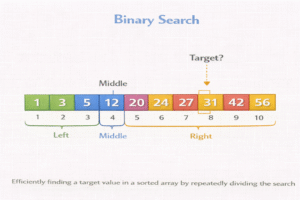
- The search begins by comparing the target value with the middle element of the array.
- If the target matches the middle element, the search is successful.
- If the target is less than the middle element, the search continues in the left half of the array.
- If the target is greater than the middle element, the search continues in the right half.
- This process repeats until the element is found or the subarray size becomes zero (i.e., the element is not found).
Example of Binary Search
PythonJavaCC++
# Binary Search (Array must be sorted)

def binarySearch(arr, target):

    low = 0
    high = len(arr) - 1

    while low <= high:

        mid = (low + high) // 2

        if arr[mid] == target:
            return mid

        elif arr[mid] < target:
            low = mid + 1   # search right half

        else:
            high = mid - 1  # search left half

    return -1


arr = [5, 10, 15, 20, 25, 30, 35, 40]

print("Index:", binarySearch(arr, 25))  # 4
public class BinarySearchExample {

    static int binarySearch(int arr[], int target) {

        int low = 0;
        int high = arr.length - 1;

        while (low <= high) {

            int mid = (low + high) / 2;

            if (arr[mid] == target)
                return mid;

            else if (arr[mid] < target)
                low = mid + 1;

            else
                high = mid - 1;
        }

        return -1;
    }

    public static void main(String[] args) {

        int arr[] = {5,10,15,20,25,30,35,40};

        int index = binarySearch(arr, 25);

        System.out.println("Index: " + index);
    }
}
#include <stdio.h>

int binarySearch(int arr[], int n, int target) {

    int low = 0;
    int high = n - 1;

    while (low <= high) {

        int mid = (low + high) / 2;

        if (arr[mid] == target)
            return mid;

        else if (arr[mid] < target)
            low = mid + 1;

        else
            high = mid - 1;
    }

    return -1;
}

int main() {

    int arr[] = {5,10,15,20,25,30,35,40};

    int index = binarySearch(arr, 8, 25);

    printf("Index: %d\n", index);

    return 0;
}
#include <iostream>
#include <vector>
using namespace std;

int binarySearch(vector<int> arr, int target) {

    int low = 0;
    int high = arr.size() - 1;

    while (low <= high) {

        int mid = (low + high) / 2;

        if (arr[mid] == target)
            return mid;

        else if (arr[mid] < target)
            low = mid + 1;

        else
            high = mid - 1;
    }

    return -1;
}

int main() {

    vector<int> arr = {5,10,15,20,25,30,35,40};

    cout << "Index: " << binarySearch(arr,25);

    return 0;
}
Time Complexity
| Case | Time Complexity |
| Best Case | O (1) |
| Average | O (log n) |
| Worst Case | O (log n) |
- n = number of elements
Space Complexity
- O (1) for iterative version
- O (log n) for recursive version (stack space)
Important:
- Works only on sorted arrays
- Much faster than Linear Search for large data