Congratulations on reaching this stage of your Machine Learning journey! Up until now, your models have likely lived entirely on your computer, inside Jupyter Notebooks. Deployment is where the magic really happens—it is the bridge between a cool data science project and a real-world software product.
Here is a simple breakdown of how model deployment works in the real industry.
What is Model Deployment?
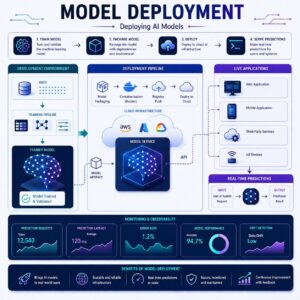
Model deployment is the process of taking your trained machine learning model out of your coding environment and integrating it into a live application where other software, systems, or human users can send it new data and receive predictions in real-time.
Connecting to What You Already Know
Think about your ML pipeline so far: you gathered data, cleaned it, trained an algorithm (like a Random Forest or Linear Regression), and tested its accuracy.
However, a highly accurate model sitting on your laptop cannot help a business. To make it useful, we have to “package” that model and put it on a server. If your ML training process was like attending medical school, deployment is setting up your doctor’s office so patients can actually visit you.
Step-by-Step: How to Deploy a Model
Here is the logical flow of taking a model from your laptop to the web.
Step 1: Saving the Model (Pickle / Joblib)
When you train a model, your computer is doing a lot of heavy mathematical lifting to find patterns. You do not want to repeat this hours-long training process every single time someone asks for a prediction.
To solve this, we use tools like Pickle or Joblib (two popular Python libraries).
- What it does: These tools “freeze” or “serialize” your trained model. They take the model’s memory (all the weights and patterns it learned) and save it as a simple file on your computer (e.g., my_model.pkl).
- Real-life analogy: It is like saving your progress in a video game. When you come back to play the next day, you load the save file instead of starting over from Level 1.
Step 2: Creating an ML API (Flask or FastAPI)
Once your model is saved, it needs a way to communicate with the outside world. This is where an API (Application Programming Interface) comes in.
- What it does: An API acts as a messenger. It listens for a request (like a user sending their age and income), hands that data to your saved model, gets the model’s prediction, and sends that prediction back to the user.
- The Tools: * Flask is a classic, lightweight Python tool for building APIs. It is very beginner-friendly.
- FastAPI is a newer, faster tool that is becoming the industry standard because it handles high volumes of requests incredibly well.
- Real-life analogy: Think of an API like a waiter in a restaurant. You (the user) give your order to the waiter (the API). The waiter takes the order to the kitchen (your ML model). The kitchen prepares the food (the prediction), and the waiter brings it back to your table.
Step 3: Building a Simple Web App
An API is great for computers to talk to each other, but it looks like a wall of code to a normal human. To make it user-friendly, we build a Web App (the “front-end”).
- What it does: This is the visual interface. It has text boxes where users can type in data, and a “Predict” button they can click. When they click the button, the web app talks to your API behind the scenes.
- Real-life analogy: This is the actual menu you read and the table you sit at in the restaurant. It makes the experience comfortable for the customer.
Practical Use Cases in the Real World
- Real Estate Website: A user types in the number of bedrooms, bathrooms, and zip code into a web form (Web App). The site sends this to a Flask API, which feeds it to a Pickled regression model. The model predicts the house is worth $450,000, and the website instantly displays this price to the user.
- Banking Fraud Detection: When you swipe your credit card, the transaction details are instantly sent via an API to a deployed ML model. The model checks the data, predicts if it is a fraudulent charge, and sends a “Block” or “Approve” signal back to the card reader in milliseconds.
Summary
- Train your model as usual.
- Save (Pickle/Joblib) your model so you don’t have to retrain it.
- Build an API (Flask/FastAPI) to act as a messenger that can receive data and return predictions.
Create a Web App to give users a friendly screen to interact with your API.