HTML Page Structure
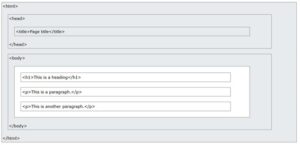
The basic structure of an HTML page is shown below. It contains the essential building-block elements (i.e. doctype declaration, HTML, head, title, and body elements) upon which all web pages are created.
- <!DOCTYPE html> – This is the document type declaration, not a tag. It declares that the document is an HTML5 document.
- <html> – This is called the HTML root element. All other elements are contained within it.
- <head> – The head tag contains the “behind the scenes” elements for a webpage. Elements within the head aren’t visible on the front end of a webpage. Typical elements inside the <head> include:
- <title>: Defines the title displayed on the browser tab.
- <meta>: Provides information like the character set or viewport settings.
- <link>: Links external stylesheets or resources.
- <style>: Embeds internal CSS styles.
- <script>: Embeds JavaScript for functionality.
- <title> – The title is what is displayed on the top of your browser when you visit a website and contains the title of the webpage that you are viewing.
- <h2> – The <h2> tag is a second-level heading tag.
- <p> – The <p> tag represents a paragraph of text.
- <body> – The body tag is used to enclose all the visible content of a webpage. In other words, the body content is what the browser will show on the front end.
- An HTML document can be created using an HTML text editor. Save the text file using the “.html” or “.htm” extension. Once saved as an HTML document, the file can be opened as a webpage in the browser.