
SQL Operators are symbols used to perform actions such as arithmetic, comparisons, or logical decisions within SQL queries. They help evaluate conditions, manipulate values, and filter data based on specific rules.
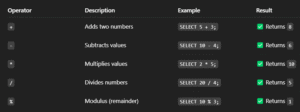
1. Arithmetic operators :- Perform basic mathematical operations on numeric data.

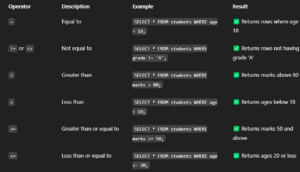
2. Comparison Operators:- Used to compare values and return TRUE or FALSE. Commonly used with WHERE clauses.
3. Logical Operators:- Combine multiple conditions in a SQL query using logic rules.
- Constraints in MySQL
Constraints in MySQL are rules that you apply to your tables to control what kind of data can be stored. They help maintain data accuracy, integrity, and reliability by preventing invalid entries.
- NOT NULL:- This ensures that a column must always have a value. You cannot leave it blank during data insertion.
Syntax:-
CREATE TABLE table_name (
column_name datatype NOT NULL
);
Example:
CREATE TABLE students (
id INT NOT NULL,
name VARCHAR(100) NOT NULL
);
→ You cannot insert a student without an id or name — both are required!
- UNIQUE:- It makes sure that every value in a column is different from all others. Great for emails, usernames, etc.
Syntax:-
CREATE TABLE table_name (
column_name datatype UNIQUE
);
Example:
CREATE TABLE users (
email VARCHAR(100) UNIQUE
);
→ Two users cannot register with the same email. Try inserting a duplicate — MySQL won’t allow it!
- PRIMARY KEY:- It uniquely identifies each row in a table. It’s like your database’s version of an Aadhaar card – unique and required.
Syntax:-
CREATE TABLE table_name (
column_name datatype PRIMARY KEY
);
Example:
CREATE TABLE employees (
emp_id INT PRIMARY KEY,
emp_name VARCHAR(50) );
→ emp_id must be unique and not null.
- FOREIGN KEY:- This links one table to another — it’s how databases build relationships like parent-child links.
Syntax:-
CREATE TABLE child_table (
column_name datatype,
FOREIGN KEY (column_name) REFERENCES parent_table(parent_column)
);
Example:
CREATE TABLE orders (
order_id INT PRIMARY KEY,
user_id INT,
FOREIGN KEY (user_id) REFERENCES users(id)
);
→ You can’t place an order for a user that doesn’t exist in the users table.
- DEFAULT:- Assigns a default value to a column if nothing is provided during insert.
Syntax:-
CREATE TABLE table_name (
column_name datatype DEFAULT default_value
);
Example:
CREATE TABLE products (
name VARCHAR(100),
stock INT DEFAULT 0
);
→ If no stock value is entered, MySQL will automatically set it to 0.
- CHECK:- It ensures that the values in a column meet a certain condition.
Syntax:-
CREATE TABLE table_name (
column_name datatype CHECK (column_name condition)
);
Example:
CREATE TABLE accounts (
id INT,
balance INT CHECK (balance >= 0)
);
→ You can’t insert a negative balance. MySQL will reject it.
- AUTO_INCREMENT:- Automatically increases the value in a numeric column each time a new row is inserted — perfect for IDs.
Syntax:-
CREATE TABLE table_name (
column_name INT AUTO_INCREMENT PRIMARY KEY
);
Example:
CREATE TABLE tickets (
ticket_id INT AUTO_INCREMENT PRIMARY KEY,
customer_name VARCHAR(100) );
→ Each new ticket will get a unique number: 1, 2, 3, …