
Introduction
This section walks you through the core of managing data in MySQL — creating and modifying tables, understanding storage engines, and working with special features like temporary tables, generated columns, and auto-incrementing keys.
- MySQL Storage Engines
A storage engine in MySQL is what handles the actual storage and retrieval of data. Each engine has different features — some support transactions, some support full-text search, and some are optimized for speed. Popular Engines include InnoDB and MyISAM.
Syntax:
CREATE TABLE table_name (
column1 datatype,
column2 datatype
) ENGINE = storage_engine_name;
Example:
CREATE TABLE logs (
id INT,
message TEXT
) ENGINE = MyISAM;
- CREATE TABLE
This command creates a new table where your data will be stored. You define the column names, data types, and constraints.
Syntax:-
CREATE TABLE table_name (
column1 datatype [constraints],
column2 datatype [constraints],
…
);
Example:
CREATE TABLE books (
id INT PRIMARY KEY,
title VARCHAR(255),
author VARCHAR(100),
published_year YEAR
);
- MySQL Data Types
MySQL provides data types like: INT, FLOAT for numbers; VARCHAR, TEXT for text; DATE, DATETIME for time and BOOLEAN, ENUM for logic or limited values
Common Syntax:-
column_name INT;
column_name FLOAT;
column_name VARCHAR(length);
column_name TEXT;
column_name DATE;
column_name DATETIME;
column_name BOOLEAN;
column_name ENUM(‘value1’, ‘value2’, …);
Example:
price FLOAT;
name VARCHAR(100);
created_at DATETIME;
- AUTO_INCREMENT
This feature lets MySQL automatically generate unique numbers, often used for primary keys like IDs.
Syntax:-
CREATE TABLE table_name (
id INT AUTO_INCREMENT,
other_columns…,
PRIMARY KEY(id) );
Example:
CREATE TABLE users (
user_id INT AUTO_INCREMENT PRIMARY KEY,
username VARCHAR(50)
);
- ALTER TABLE
This command modifies the structure of an existing table. You can use it to add, remove, or change columns.
5.1. Add a New Column
Syntax:-
ALTER TABLE table_name ADD column_name datatype;
Example:
ALTER TABLE users ADD email VARCHAR(100);
5.2. Remove a Column
Syntax:-
ALTER TABLE table_name DROP COLUMN column_name;
Example:
ALTER TABLE users DROP COLUMN email;
5.3. Modify a Column
Syntax:-
ALTER TABLE table_name DROP COLUMN column_name;
Example:
ALTER TABLE users MODIFY username VARCHAR(150);
- RENAME TABLE
This command changes the name of a table without affecting the data or structure.
Syntax:-
RENAME TABLE old_table_name TO new_table_name;
Example:
RENAME TABLE users TO members;
- DROP TABLE
DROP TABLE permanently deletes a table and all its data from the database.
Syntax:-
DROP TABLE table_name;
Example:
DROP TABLE members;
- TRUNCATE TABLE
This command clears all rows in a table, but keeps the structure so you can reuse it.
Syntax:-
TRUNCATE TABLE table_name;
Example:
TRUNCATE TABLE products;
- Temporary Tables
Temporary tables exist only during the current session. When the connection closes, the table disappears automatically.
Syntax:-
CREATE TEMPORARY TABLE table_name (
column1 datatype,
column2 datatype );
Example:
CREATE TEMPORARY TABLE temp_orders (
id INT,
status VARCHAR(20)
);
- Generated Columns
These are virtual or stored columns whose values are automatically calculated based on other columns.
Syntax:-
CREATE TABLE table_name (
column1 datatype,
column2 datatype,
generated_column_name datatype
GENERATED ALWAYS AS (expression) [VIRTUAL | STORED]
);
Example:
CREATE TABLE employees (
first_name VARCHAR(50),
last_name VARCHAR(50),
full_name VARCHAR(100) GENERATED ALWAYS AS (CONCAT(first_name, ‘ ‘, last_name))
);
- MySQL CRUD OPERATIONS
Introduction
CRUD stands for Create, Read, Update, and Delete — the basic operations you perform on data in any MySQL database. These operations allow you to insert new records, retrieve data, update existing values, and remove records when needed.
The sample tables used in the following examples are as follows:-
- Customer Table:
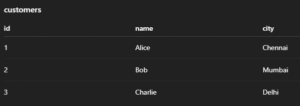
2. Order Table:

3. Employee table:
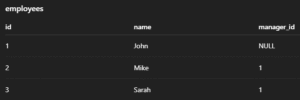
4. Department table:
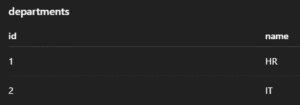
- Marks table:

- Student table:
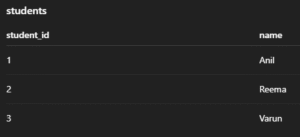
1. INSERT INTO – Add New Records:- This command inserts new rows into a table. You can insert values into all or selected columns.
General Syntax:
INSERT INTO table_name (column1, column2, …) VALUES (value1, value2, …);
Example:
INSERT INTO students (id, name, age) VALUES (1, ‘Arun’, 20);
Output:-

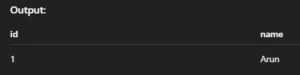
- INSERT IGNORE – Skip Duplicates Silently:- Inserts data but skips the row if it violates a uniqueness constraint like PRIMARY KEY.
General Syntax:
INSERT IGNORE INTO table_name (column1, column2, …) VALUES (value1, value2, …);
Example:
INSERT IGNORE INTO students (id, name) VALUES (1, ‘Arun’);
Output:-
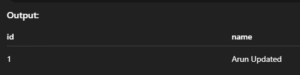
- INSERT … ON DUPLICATE KEY UPDATE – Upsert (Insert or Update):- If a duplicate key is found, it updates the row instead of inserting a new one.
General Syntax:-
INSERT INTO table_name (column1, column2)
VALUES (value1, value2)
ON DUPLICATE KEY UPDATE column2 = new_value;
Example:
INSERT INTO students (id, name) VALUES (1, ‘Arun’)
ON DUPLICATE KEY UPDATE name = ‘Arun Updated’;
Output:-
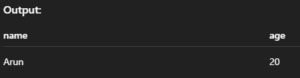
- SELECT – Read Data from Table:- Retrieves data from one or more tables. You can select specific columns or all (*).
General Syntax:-
SELECT column1, column2 FROM table_name;
— OR
SELECT * FROM table_name;
Example:
SELECT name, age FROM students;
Output:-
- SELECT DISTINCT – Avoid Duplicate Rows:- Returns only unique records from the selected column(s).
General Syntax:-
SELECT DISTINCT column_name FROM table_name;
Example:
SELECT DISTINCT age FROM students;
Output:-
- SELECT WHERE – Conditional Read:- Filters records based on a given condition.
General Syntax:-
SELECT column1, column2 FROM table_name WHERE condition;
Example:
SELECT * FROM students WHERE age > 18;
Output:-

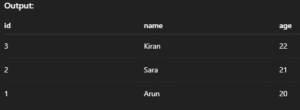
- SELECT ORDER BY – Sort Results:- Used to sort the output in ascending (ASC) or descending (DESC) order.
General Syntax:-
SELECT * FROM table_name ORDER BY column_name ASC|DESC;
Example:
SELECT * FROM students ORDER BY age DESC;
Output:-
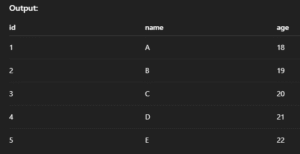
- SELECT LIMIT – Limit Output Rows:- Fetches only a fixed number of rows from the result.
General Syntax:-
SELECT * FROM table_name LIMIT number_of_rows;
Example:
SELECT * FROM students LIMIT 5;
Output:-
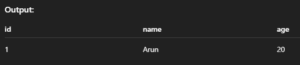
- SELECT LIKE – Pattern Matching:- Finds rows where column values match a specific pattern using % or _.
General Syntax:-
SELECT * FROM table_name WHERE column_name LIKE ‘pattern’;
Example:
SELECT * FROM students WHERE name LIKE ‘A%’;
Output:-
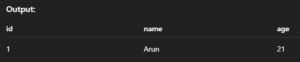
- UPDATE – Change Existing Data:- Updates values in one or more columns for selected rows.
General Syntax:-
UPDATE table_name SET column1 = value1, column2 = value2 WHERE condition;
Example:
UPDATE students SET age = 21 WHERE id = 1;
Output:-
- UPDATE with JOIN – Modify Using Related Tables:- Allows updates based on matching rows in other tables.
General Syntax:-
UPDATE table1
JOIN table2 ON table1.column = table2.column
SET table1.column_to_update = value
WHERE condition;
Example:
UPDATE orders o
JOIN customers c ON o.customer_id = c.id
SET o.status = ‘Confirmed’
WHERE c.city = ‘Chennai’;
Output:-

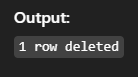
- DELETE – Remove Data from Table:- Deletes rows matching a condition from a table.
General Syntax:-
DELETE FROM table_name WHERE condition;
Example:
DELETE FROM students WHERE id = 1;
Output:-
- DELETE with JOIN – Delete from Multiple Tables:- Allows deleting rows based on matching conditions in another table.
General Syntax:-
DELETE alias1 FROM table1 AS alias1
JOIN table2 AS alias2 ON alias1.column = alias2.column
WHERE condition;
Example:
DELETE s FROM students s
JOIN dropped_list d ON s.id = d.student_id;
Output:-

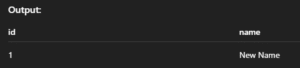
- REPLACE INTO – Insert or Replace Row:- Inserts a row or replaces the existing row with the same primary key.
General Syntax:-
REPLACE INTO table_name (column1, column2, …) VALUES (value1, value2, …);
Example:
REPLACE INTO students (id, name) VALUES (1, ‘New Name’);
Output:-
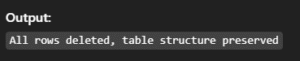
- TRUNCATE – Delete All Data (Preserve Table):- Removes all rows from a table quickly but keeps its structure.
General Syntax:-
TRUNCATE TABLE table_name;
Example:
TRUNCATE TABLE students;
Output:-
- SELECT INTO OUTFILE – Export Query Result to File:- Saves the result of a SELECT query into a file on the server.
General Syntax:-
SELECT * FROM table_name INTO OUTFILE ‘/path/to/file.csv’;
Example:
SELECT * FROM students INTO OUTFILE ‘/tmp/students.csv’;
Output:-

- LOAD DATA INFILE – Import Data from File:- Loads data from a file directly into a MySQL table.
General Syntax:-
LOAD DATA INFILE ‘/path/to/file.csv’ INTO TABLE table_name
FIELDS TERMINATED BY ‘,’ ENCLOSED BY ‘”‘ LINES TERMINATED BY ‘n’;
Example:
LOAD DATA INFILE ‘/tmp/students.csv’ INTO TABLE students;
Output:-
